Deli Paper
Foundations
Every value the sites share, with what it is for. The same names are custom properties in tokens.css.
Colour
- Set running text in
textoncard; headings and the wordmark inheading; secondary text (row details, captions, header links at rest) inmuted. - Separate rows with
rulehairlines. A border that marks a control (an input, the outline button) isrule-strong, which holds 3:1 oncard. accent(deli red) is for text selection and the highlighter. It is never body text.- Money uses
creditanddebit. They share a lightness, so the + and − signs are required; colour only repeats them. card-sunkenis for code wells.pageshows only where the paper is thin or still fading in.- There is a dark theme for app screens that want one. The paper darkens itself (×0.8) under it; the card becomes
carddark.
Surfaces and text
- page#e7e6e2 · #0f0f0e darkThe ground under the paper. Shows only where the paper is thin or still fading in.
- card#fcfcfb · #1a1a18 darkThe sheet everything sits on: the one card on the paper, menus, dialogs.
- card-sunken#efefeb · #242421 darkCode blocks, inline code, quiet wells inside the card.
- text#0a0a0a · #f2f1ed darkRunning text on card and card-sunken. 19:1 light, 15:1 dark.
- heading#171717 · #fafaf7 darkHeadings, the wordmark, links in the header on hover, the ink button's fill.
- muted#6b6b66 · #a5a49d darkSecondary text: row details, captions, header links at rest. On card 5.2:1 light, 7.0:1 dark; on card-sunken 4.6:1 and 6.2:1.
- rule#e6e6e1 · #2e2e2b darkHairlines between rows and under the pinned nav (1.2:1, decorative). Use rule-strong where a border marks a control.
- rule-strong#8f8e88 · #6b6a64 darkBorders that mark a control (inputs, the outline button): 3.2:1 on card in both themes.
- on-ink#fcfcfb · #1a1a18 darkText on a heading-coloured fill, such as the ink button's label.
- focus#0a0a0a · #f2f1ed darkThe 2px keyboard focus outline, 3px off the element. Matches text so it reads on every surface.
Highlights
- accent#d6402f · #f0705f darkDeli red: text selection and the highlighter only. Never body text: 4.4:1 on card in light.
- on-accent#fcfcfb · #1a1a18 darkSelected text on an accent fill (4.4:1 light, 6.0:1 dark).
- marker-redrgba(214, 64, 47, 0.42) · rgba(240, 112, 95, 0.4) darkThe highlighter stroke behind the one line that matters on a page.
- marker-yellowrgba(247, 214, 74, 0.6) · rgba(247, 214, 74, 0.32) darkThe stroke that paints in behind a link on hover.
- marker-bluergba(150, 195, 238, 0.7) · rgba(120, 170, 230, 0.45) darkThe pastel blue stroke for a name in running text.
- hook-accent#5b8def · #7ea6f2 darkmhook's highlighter and the console's active-tab underline. Marks, never text.
Money
- credit#1e7a4c · #4cc38a darkMoney coming back to you, on card (5.2:1 light, 7.9:1 dark). Same lightness as debit, so always write the + sign; colour never carries it alone.
- debit#c4302b · #ff7a6e darkMoney you owe, on card (5.4:1 light, 6.9:1 dark). Always write the − sign; colour never carries it alone.
Paper colourways
- deli-ink#111111Deli paper, the portfolio's colourway: the dark checks.
- deli-paper#f7f7f7Deli paper, the portfolio's colourway: the light checks.
- ledger-credit#bae0c4Ledger paper (splitova): the pastel green checks, where + amounts are printed.
- ledger-debit#f4c9c3Ledger paper (splitova): the pastel red checks, where − amounts are printed.
- ledger-credit-ink#267046The + amounts printed on ledger-credit checks, at 72% opacity. Decorative (4.1:1) and hidden from assistive tech.
- ledger-debit-ink#a83e32The − amounts printed on ledger-debit checks, at 68% opacity. Decorative (4.1:1) and hidden from assistive tech.
- hook-ink#b3c8f1Hook paper (mhook): the pastel blue checks.
- hook-paper#f9f5edHook paper (mhook): the cream checks.
Type
- One family, Manrope (variable, 200–800), from
fonts/manrope-latin-wght-normal.woff2;monois the system monospace. displayfor the one hero headline, set as clamp(2.1rem, 5vw, 3rem), max 15ch, balanced.title(24px / 400) for page and section headings.subhead(20px / 600) for h3 in long text.body(20px / 32px / 500) for everything else in the card, stepping tobody-compact(18px / 28px) under 720px.navfor header links;captionunder figures;uiandui-smallfor dense app screens such as the mhook console;figurefor money.- Turn on tabular figures (
font-variant-numeric: tabular-nums) wherever numbers line up.
Display
- Split bills in rupees. Settle up with UPI.display 48px / 52px · 600 · -2.16pxThe hero headline, once per page. Set as clamp(2.1rem, 5vw, 3rem) with max-width 15ch.
- Projectstitle 24px / 28px · 400 · -0.4pxPage and section headings (h1, h2). Light weight; size does the work.
Text
- I enjoy building cool stuff on the internet.body 20px / 32px · 500All running text and row text. 18px/28px under 720px wide.
- Groups for the flat and the trip.body-compact 18px / 28px · 500Body under 720px wide.
- Information mhook usessubhead 20px / 28px · 600h3 inside posts and legal pages.
- Indexnav 20px / 24px · 500Header links, stacked or pinned. Muted at rest, heading on hover and when current.
- Every group, where you standcaption 16px / 24px · 500Under phone frames and figures, in muted.
Interface
- Recent notificationsui 14px / 20px · 500Dense app screens such as the mhook console: tables, menus, forms.
- Has hooksui-small 12px / 16px · 500Badges, table heads, timestamps.
- +₹1,240figure 20px / 24px · 600Money and counts. Use tabular figures where numbers line up.
Code
- curl -X POST "$HOOK_URL"code 14px / 22px · 400Code blocks at 0.9rem / 1.55, inline code at 0.85em.
Space and layout
- The card is
card-width(51.2rem) wide at most andspace-16inside: two equalColumnswith aspace-8gutter. - Sections are
space-30apart (space-18under 720px); the header isspace-30above the first one. Paragraphs arespace-5apart; rows arespace-3tall on each side. - Below
breakpoint(720px) columns stack, rows drop their detail under the title, and the card's padding is 32px byspace-6. - Radii: the card is
radius-none. Things you hold get corners:radius-pillbuttons and badges,radius-mdcode blocks and inputs,radius-phonescreenshots.
Spacing
- space-312pxRow padding above and below; gap inside a row.
- space-520pxBetween paragraphs; between a phone and the next.
- space-624pxUnder a section heading; card padding sideways under 720px.
- space-832pxThe gutter between the card's two columns.
- space-1456pxBetween blog entries; the pinned nav strip's height.
- space-1664pxThe card's padding on every side.
- space-1872pxBetween sections under 720px wide.
- space-30120pxBetween sections, and under the header.
Radii
- radius-none0pxThe card. Paper and card are square; corners belong to things you hold.
- radius-sm4pxInline code.
- radius-md8pxCode blocks, inputs and console controls.
- radius-phone12%Phone screenshots (12% / 5.5% of the frame).
- radius-pill999pxThe ink button and badges.
Sizes and shadow
- card-width51.2remThe card's max width: two 330px columns, a 32px gutter and 64px padding.
- measure32remMax width of a hero lede.
- breakpoint720pxBelow this the card's columns stack and type steps down.
- shadow-phone0 1px 2px rgba(0, 0, 0, 0.04), 0 18px 36px -18px rgba(0, 0, 0, 0.28)Phone frames only. Nothing else on the card casts a shadow.
Motion
Motion is the system's one indulgence and it always arrives, never loops (except the ledger, which settles a few amounts every 2.6s).
- Paper fades in over
duration-paperonce painted. - Rise-in: content rises 14px and fades in as it enters the window,
duration-risewithease-out, 70ms apart, eight steps at most (Reveal). Never on the header. - Highlighter: the marker draws left to right over
duration-drawwithease-draw, after 450ms (Marker). - Link hover: a yellow stroke paints in from the left over
duration-instant, linear (TextLink). - Pinned nav: the strip slides down over
duration-strip; each link glides to its pinned place overduration-glide, 30ms apart, and the app's logo slides in at the strip's left end (Masthead). - Counting: an amount grows from zero over
duration-countwithease-out(Amount, the ledger paper); later changes take 900ms. - Under
prefers-reduced-motioneverything shows in its final state at once. Script-driven motion reads the same numbers fromDeliPaper.motion.
Durations
- duration-instant120msThe link marker painting in on hover. Linear.
- duration-quick200msColour changes on header links.
- duration-strip450msThe pinned nav strip sliding down.
- duration-glide480msEach nav link gliding to its pinned place, 30ms apart.
- duration-rise700msContent rising in, 70ms apart, at most 8 steps.
- duration-paper900msThe paper fading in once painted.
- duration-draw1000msThe highlighter drawing across its line, after a 450ms wait.
- duration-count1300msA ledger amount counting up from zero; later changes take 900ms.
Easings
- ease-outcubic-bezier(0.2, 0.8, 0.2, 1)Everything that arrives: rise-in, the nav glide, the strip.
- ease-drawcubic-bezier(0.6, 0, 0.2, 1)The highlighter: slow start, quick middle, soft landing.
- ease-linearlinearThe hover marker, so it paints at an even pace.
States and focus
- Header links go
muted→headingoverduration-quick. The ink button dims to 85% on hover; the outline button fills withcard-sunken. - Keyboard focus is a 2px
focusoutline 3px off the element (2px on inputs), on every surface. - Disabled is 45% opacity. Errors are
debit, under the field, saying what to do.
Marks and images
- Marks sit straight on the page in
heading, never in a coloured tile:assets/Logos/. The portfolio's mark (a white sphere with a glare) is its favicon. - App screenshots are iPhone-sized captures of real working screens with sample data, 640px wide JPEG, in a
Phoneframe. Never sign-in screens or test copy. - Link previews are 1200×630: the card on the app's paper with the mark, two lines and the page's marker line.
Logos
 portfolio-mark.svg
 splitova-mark.svg
 mhook-mark.svg
Marks sit straight on the page, never in a coloured tile.
portfolio-mark.svg: the portfolio's mark and favicon, a white sphere with a glare and aheadingrim at 28%. Multicolour; use as is.splitova-mark.svg: splitova's divide mark, two dots and a tilted bar. Single ink,#171717(heading); set it beside the lowercase wordmark "splitova" inheading, weight 600. On a dark theme, inline the SVG withfill: currentColorso it followsheading.mhook-mark.svg: mhook's hook mark. Single ink,#171717(heading); beside the lowercase wordmark "mhook". Inline it withstroke: currentColoron a dark theme.
The app stores and home screens keep the filled app icons (white mark on ink); those are app assets, not page marks.
Screens
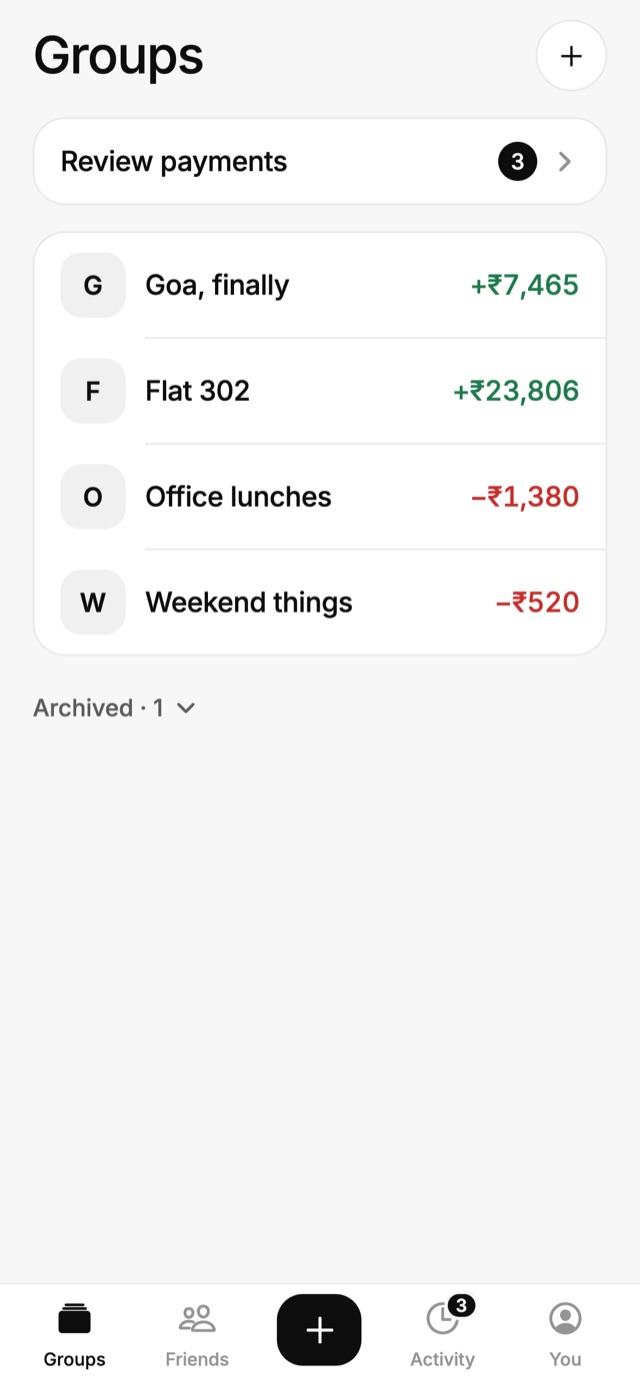
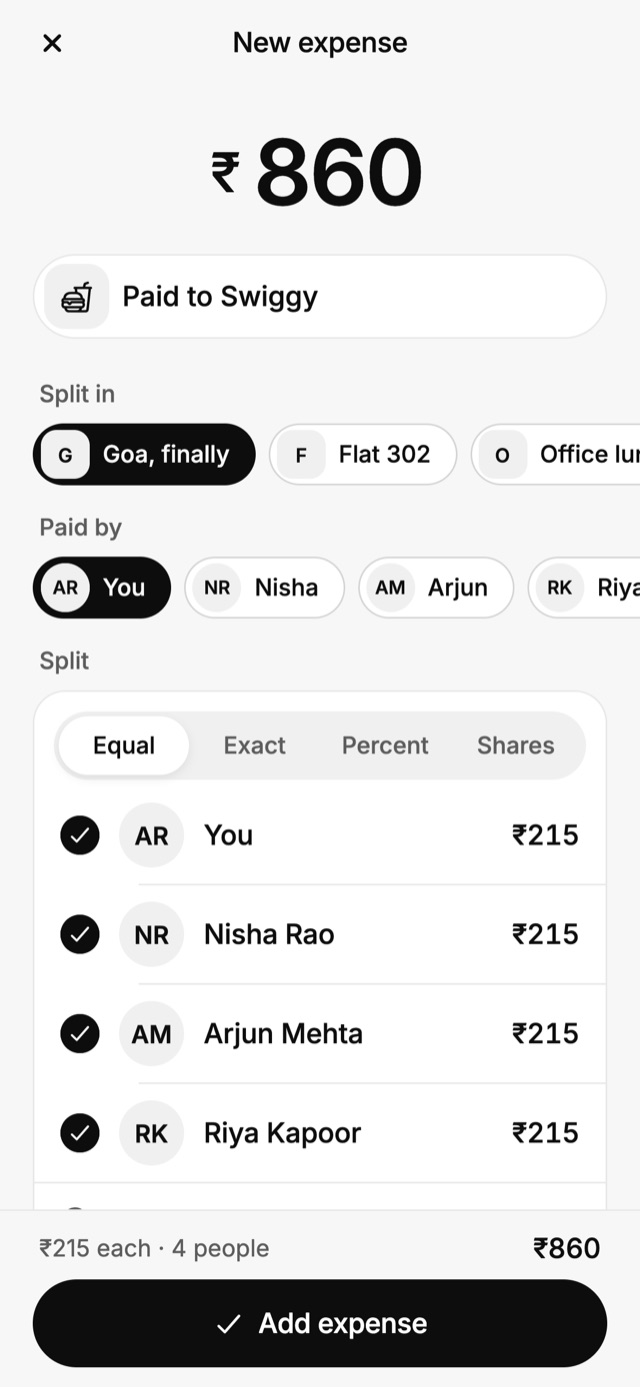
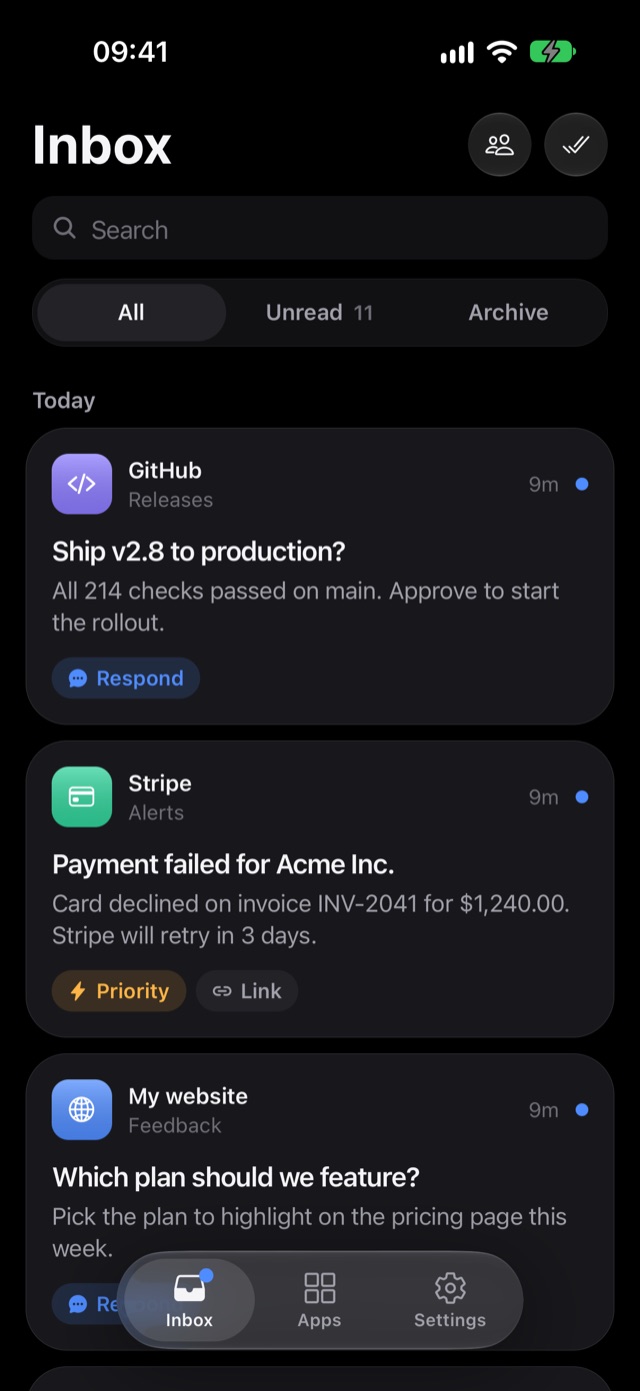
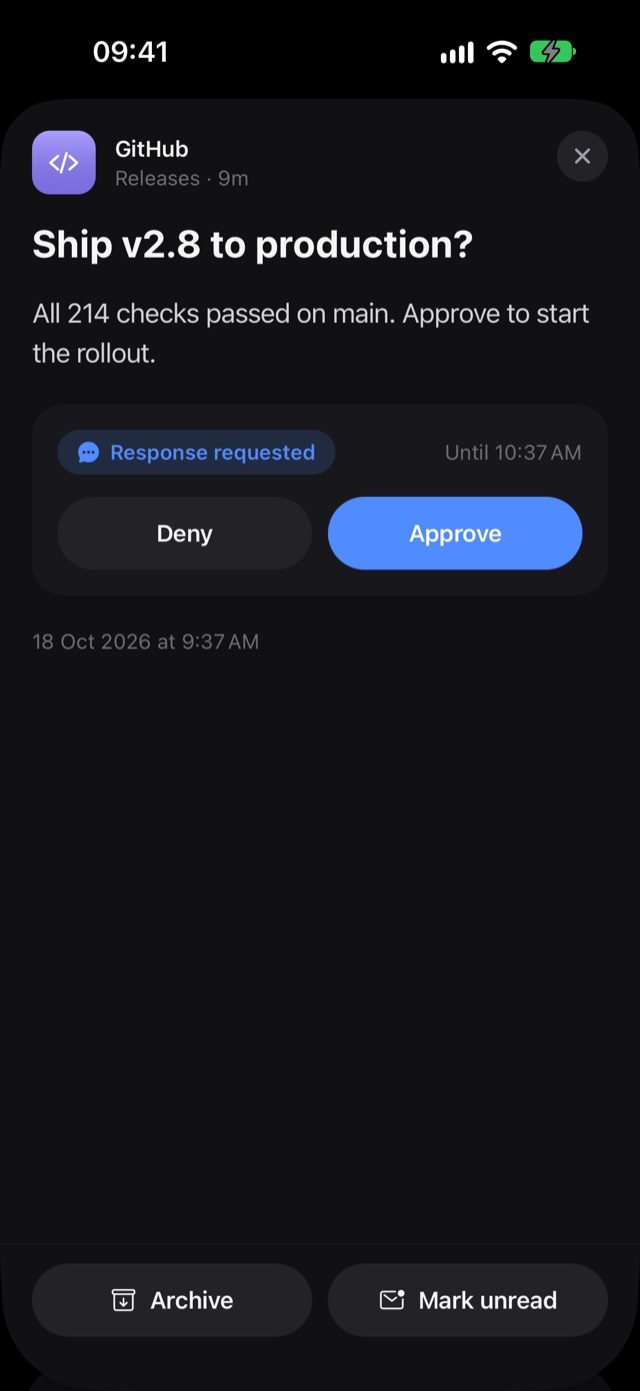
Real app screens with sample data, 640px wide JPEG, for Phone and Phones.
splitova-groups.jpg,splitova-split.jpg: splitova's groups and a payment ready to split, from its sample mode at iPhone size (1179×2556).mhook-inbox.jpg,mhook-approval.jpg: mhook's inbox and an approval, from the iOS simulator (1206×2622).